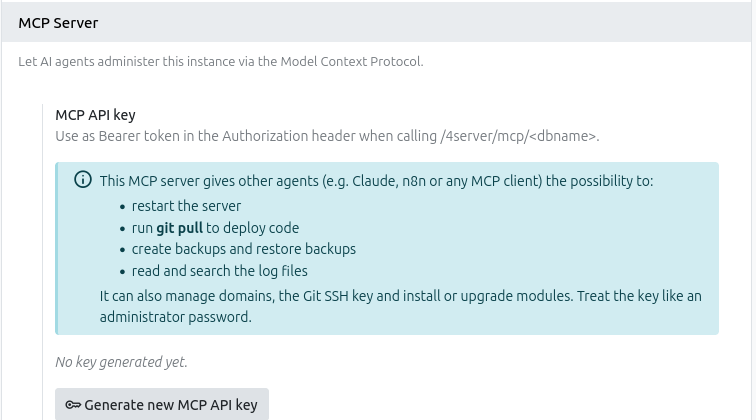
Hosting work usually means a browser tab, a control panel, and a stack of logins you would rather not think about. That part can now move into the place you already spend your day: your agent. We added an MCP server that gives your agent direct control over your ODOO4projects hosting.
What the MCP server can do
Once connected, your agent can handle the routine operations that normally pull you out of whatever you were doing:
- Restart your server
- Upload modules
- Add and check domains
- Manage your backups
- Read your log files
MCP is the interface that lets an agent call real tools instead of only talking about them. The difference matters: a restart, a backup, or a log read is an action, not a suggestion. When those actions are exposed to the agent, they stop being a manual checklist and become something you can simply ask for.
Why this is worth setting up
The value is not that you save a few clicks. It is that the steps belong together. Deploying a module and reading the log afterwards, or taking a backup and then restarting, are one task in your head. With the MCP server connected, they are one request.
It also removes the usual guessing. When something looks off, you can ask the agent to pull the logs first, then decide whether a restart is actually needed, instead of restarting on instinct and hoping.
Connecting it to Claude Code
- Get your server details. Grab the connection information for the MCP server from your Odoo hosting setup, along with any credentials or access token it requires.
- Register the server. Add it to your MCP configuration in Claude Code, the same way you register any other MCP server. Provide the connection details from the previous step.
- Confirm the connection. Ask the agent to list what it can do, or start with something harmless such as reading the log files. If that works, the server is wired up correctly.
- Work in plain language. From there, requests like checking a domain or restarting the server go through the agent rather than a control panel.
- Treat it as production access. The agent can now do things that affect a live environment, so give it the credentials you are comfortable with and nothing more.
Habits that keep it safe
- Read the logs before restarting. The restart may not be the fix.
- Take a backup before uploading modules, not after something breaks.
- Verify domains after making changes, rather than assuming the change landed.
- Keep the agent in the loop for anything destructive, so you can see what was done and why.
None of this replaces knowing your hosting. It removes the friction between knowing what to do and actually doing it, which is usually where the time goes.
Manage your ODOO service with MCP and your Hermes Agent.